Customizing saturation functions
Once you have defined your saturation function type (i.e. Brooks-Corey, Lambda, Leverett J, or Thomeer), you can see the parameters included in these functions (e.g. Swirr, λ, a, etc.) in the Nested Expressions window, on the Saturation Functions form. By using the predefined trends (i.e. exponential, linear, logarithmic, power), you can define these parameters as functions of Porosity, or Permeability, or √(Porosity/Permeability).
Instead of using the predefined trends, you also have the option of using a custom trend. With a custom trend, you can define the parameters included in your saturation function (e.g. Swirr, λ, a, etc.) as functions of porosity and/or permeability in any mathematical relationship you want.
To customize saturation functions
- On the Custom Expression form (which is opened by setting the Trend to 'Custom' and clicking on the active custom expression icon
 ), type in the expression you want to define for the parameter.
 - The following syntax conventions are used for the custom expression:
- For porosity and permeability, generic property names are used in the custom expression. The specific grid object names are defined in the saturation function model itself.
- You cannot include any other variables as you would do in the Property Calculator.
- Various math functions and mathematical constants can be inserted into your expression, the same way it is done via the Property Calculator. See Math functions, Mathematical constants for more on this.
- You can also include constant numbers.
- Click Apply to save the expression and keep the form open, or click OK to save the expression and close the form. The expression is listed in the Nested Expressions section on the Saturation Functions form.
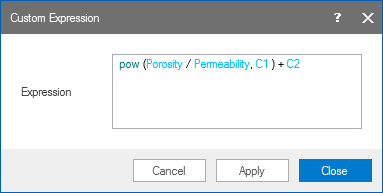
When you type in your customized function with the correct syntax, the variables, coefficients, and math functions will be displayed in different colors. click to enlarge